Deploy apps, patch devices, support users. One console.
Pckgr RMM is a standalone endpoint management platform for Windows and macOS. Run it on its own, or alongside Microsoft Intune and other MDMs.
- App deployment for Windows and macOS
- Automated patching and CVE detection
- Built-in remote desktop for Windows and macOS
Free for up to 5 devices. Pro is $10 a month for up to 10 devices, then $1 per device per month.

Everything you need.
No scripting required.
Automated application updates
Keep apps current on Windows and macOS with scheduled updates, streamlined rollouts and consistent version control. No manual overhead.
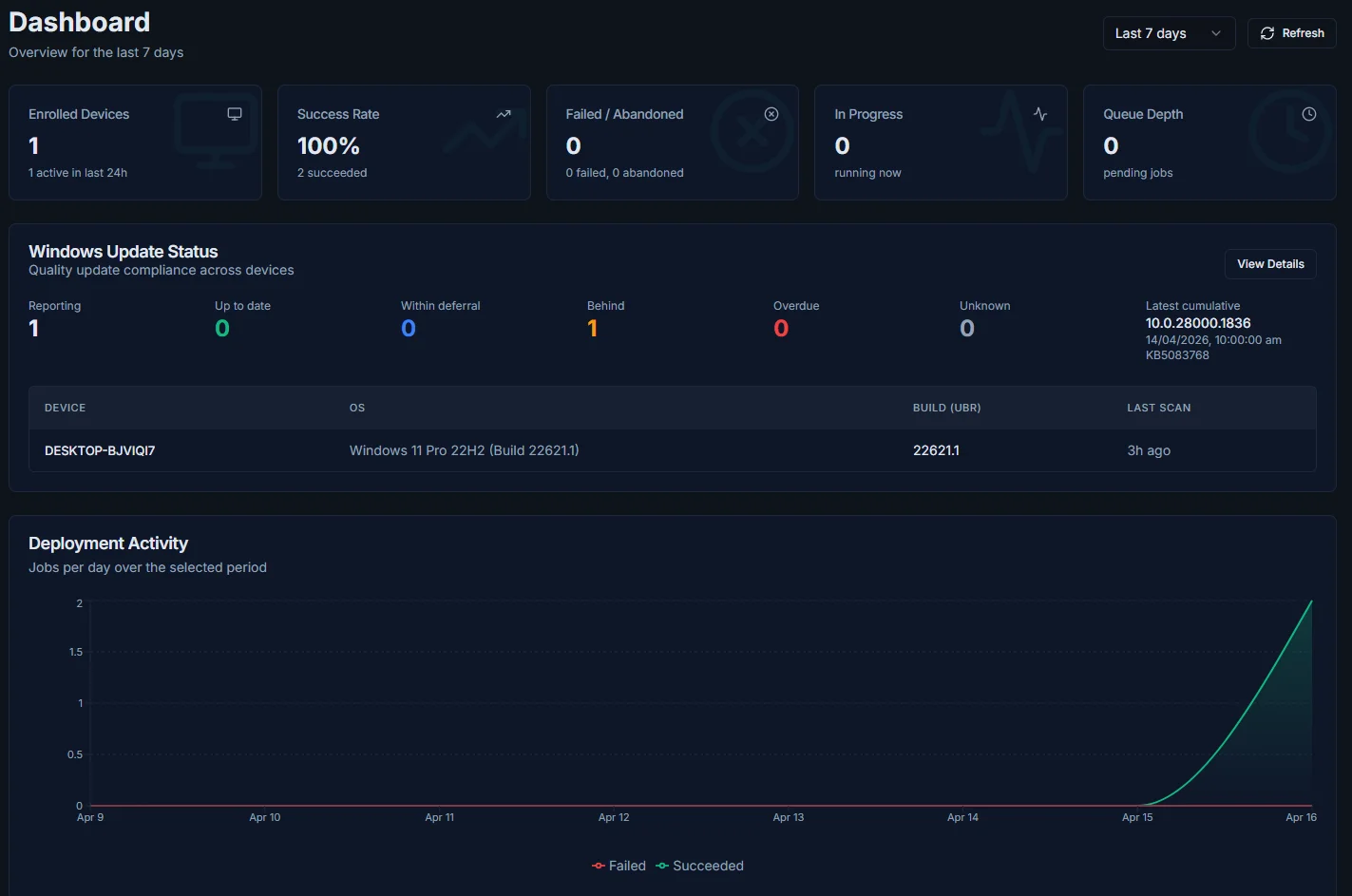
Security posture dashboard
Understand where risk lives across your fleet, track patch status, and take action before vulnerabilities become incidents.
Policy management and compliance
Windows only
Define and enforce policies that keep devices aligned with your standards and stay compliant over time.
CVE and vulnerability tracking
Windows only
Every installed app is cross-referenced against the National Vulnerability Database daily, matching versions to known CVEs so you can pinpoint and remediate exposed devices fast.
Built-in remote desktop
View and control any managed Windows or Mac directly from the portal. Peer-to-peer encrypted sessions with clipboard sync and multi-monitor support. No VPN or third-party tools required.
Remote shell
Windows only
Open a PowerShell or Command Prompt session on any managed device from the portal, as the system or as the signed-in user. Every session is recorded.
App rollback
Windows only
Roll an app back to an earlier version in a few clicks. An impact preview shows which devices will change before anything runs.
Public API
Pull devices, apps, deployments and patch compliance into Power BI, Excel or your own scripts through a read-only REST API with per-key access.
Custom applications
Windows only
Package and deploy your own Windows applications with the Custom Applications tool, with update workflows and control.
Windows and macOS.
One console.
Pckgr manages Macs with a lightweight native agent. It installs like any Mac app, needs no MDM enrollment, and runs happily alongside Jamf, Intune or whatever you already have. Same workflow as Windows.
macOS support is agent-based, so it does not include MDM capabilities such as configuration profiles, FileVault, or DEP and ADE enrollment.
| Capability | Windows | macOS |
|---|---|---|
| App deployment from the catalog | Available | Available |
| Automatic app updates | Available | Available |
| ScriptsPowerShell on Windows, Zsh and Bash on macOS | Available | Available |
| Software inventory | Available | Available |
| Device groups (static and rule-based) | Available | Available |
| Deployment monitoring | Available | Available |
| Audit log | Available | Available |
| Multi-tenant management | Available | Available |
| Read-only public API | Available | Available |
| Remote desktop (browser-based, peer-to-peer) | Available | Available |
| Custom applications | Available | Not available |
| Remote shell (PowerShell and Command Prompt) | Available | Not available |
| App rollback | Available | Not available |
| Self-Service Portal for end users | Available | Not available |
| Policy management and settings catalog | Available | Not available |
| Windows Update rings and patch compliance | Available | Not available |
| CVE and vulnerability tracking | Available | Not available |
Remote desktop is available on Windows and macOS. Remote shell, app rollback, the Self-Service Portal, policy management, Windows Update rings, CVE tracking and custom applications are available on Windows only.
Standalone, or side by side
with your stack.
Standalone by design
Pckgr RMM runs independently as your RMM for Windows and macOS. No MDM required.
Plugs into your existing setup
No migration, no rebuilding policies, no disruption. Coexists with Intune, Jamf or any MDM.
Fills the gaps MDMs leave open
App packaging, automated patching, CVE tracking and remote desktop.
Want application automation inside Microsoft Intune itself? That’s Pckgr for Intune.
How Pckgr RMM works.
Install the Pckgr RMM agent
Install the lightweight agent on your Windows and Mac devices. They appear in your console, ready to manage.
Connect and configure your fleet
Group devices, then choose which apps, policies and scripts are installed, updated and maintained.
Stay continuously secure
Pckgr RMM keeps apps patched, policies compliant and your environment healthy over time, automatically.
Built for teams who want
control without the overhead.
- IT teams managing mixed environments
- Businesses without an existing endpoint manager
- Security-focused organisations reducing patch risk
- MSPs supporting multiple clients
- Lean teams who need automation by default
- Anyone can use it. No code or scripts required
Questions about Pckgr RMM?
Answers to common questions about the platform, macOS support, security and pricing.
Ready to make endpoint management less manual?
Free for up to 5 devices. Pro is $10 a month for up to 10 devices, then $1 per device per month.